
SponsorSorted Inbox Kit · for YouTube creators
Your sponsor emails, sorted from the scams and tracked to payday
A Gmail setup kit for YouTubers who run brand deals without a manager. Filters that label sponsor mail, reply templates, a deals spreadsheet and payment follow-up emails, for $29.
Get the Inbox Kit for $29One-time payment · Set up in about 15 minutes · 14-day refund, no questions asked
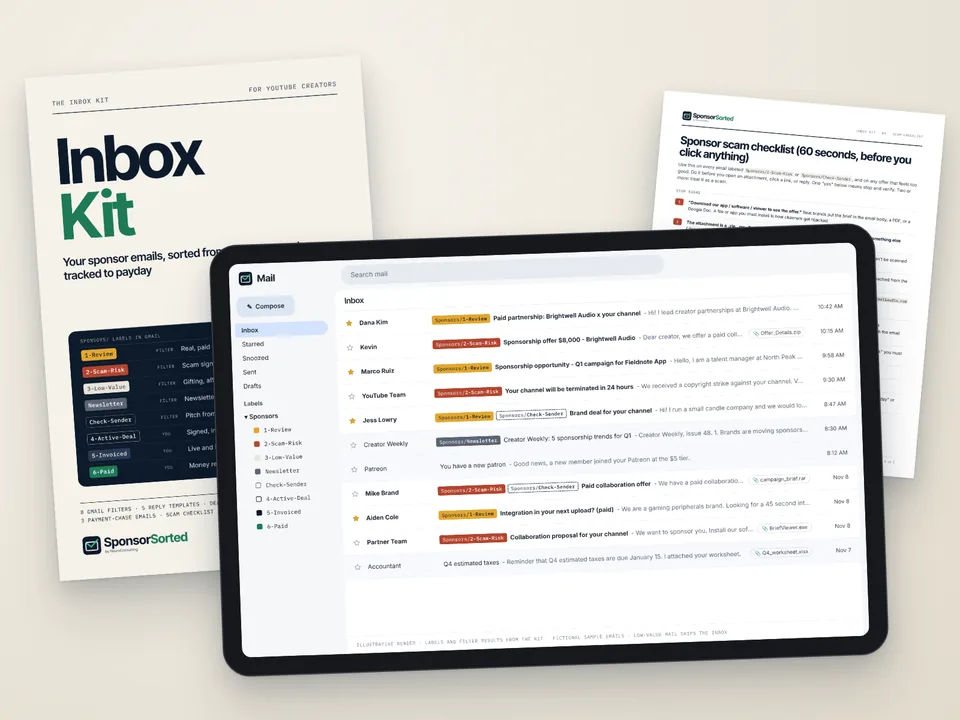
Brand deals start in your inbox, and so does the mess.
A real brand pitch lands between a “collab” email asking you to download a demo, a newsletter, and three comments notifications. You reply, they reply, and the deliverable date lives somewhere in that thread. The invoice goes out. Then you have to remember to check whether it got paid.
Creators describe it in their own words:
“Tracking who reached out, what we agreed on, deadlines, invoices, follow-ups... I still use a Google Sheet and it's starting to fall apart.”A creator on r/PartneredYoutube
“on top of making videos, I'm also constantly managing brand deals, replying to emails, keeping track of deadlines, and chasing invoices.”A creator on X
Two things cost you the most here.
The fake sponsor
Google's Threat Analysis Group reported in October 2021 a campaign that targeted YouTubers with fake collaboration offers, often a “demo” of antivirus, VPN, photo editing or game software. Once a creator agreed to the deal, they got a link to download the software. Running it installed malware that stole browser cookies, which let the attackers take over channels. Google said it identified around 15,000 actor accounts, most of them created for this campaign, and at least 1,011 domains created solely to deliver the malware. (source)
The brand that pays late.
The video is live, the invoice is out, and the due date passes. Chasing feels awkward, so it slips. Your sheet says “sent” and nothing else.
A simple system in the Gmail and Google Sheets you already use.
Gmail filters give sponsor mail its own labels and flag scam signals. A checklist tells you what to verify before you click. Reply templates ask for everything up front. A deals tracker shows which invoice is due and which reminder to send next.
Works with personal Gmail or Google Workspace in a desktop browser, plus Google Sheets. No paid software, add-ons or scripts, and nothing in the kit asks for access to your accounts.
Setup: 5 steps, about 15 to 20 minutes on a computer, following the Quick Start. After that, a weekly 10-minute check keeps it current.
8 Gmail filters you import in one file
(mailFilters.xml). They sort sponsor-style email into labels:
- Sponsors/1-ReviewFilters F5, F6. Looks like a real paid offer, with signals such as “flat fee”, “budget is”, “your rates”, “paid partnership”, CPM or an insertion order. Starred and marked important.
- Sponsors/2-Scam-RiskFilters F1 to F3. Only adds the label, so these stay in your inbox where you'll see the warning. It means the email has at least one scam signal, such as a “to view the offer” step, a request to sign in with Google or YouTube, a “password protected” file, an upfront fee or gift card, crypto or gambling words, a move to Telegram or WhatsApp, or a .zip, .rar, .exe, .scr or similar attachment. F2 flags those attachment types on any email. F3 flags “YouTube Team” or strike warnings that don't come from youtube.com or google.com.
- Sponsors/3-Low-ValueFilter F4. Gifting, commission-only, SEO or “grow your channel” pitches with no paid signal. They skip your inbox, so you skim them once a week.
- Sponsors/Check-SenderFilter F7. An extra flag when a pitch comes from a free address like gmail.com, outlook.com or yahoo.com. Small brands do this too, so it means “verify first”.
- Sponsors/NewsletterFilter F8. Marketing newsletters that mention sponsorships get their own label instead of crowding your Review pile. Label only, nothing is archived.
No filter deletes, forwards or marks anything as read. A wrong match only puts an email under the wrong label. A plain-English guide explains every rule and how to change one.
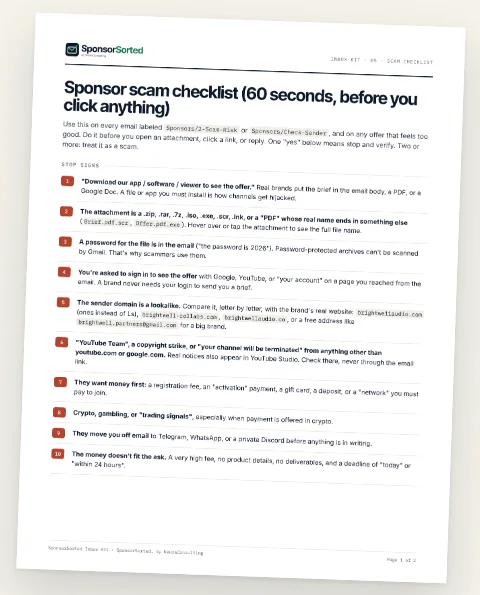
Scam checklist
- 10 red flags to check before you open, click or reply.
- A 5-step way to verify a brand in about 2 minutes.
- A 7-step plan for what to do if you already clicked or downloaded.
5 reply templates
Each with a filled example.
- Budget & brief questions
- Rate & deliverables quote
- Timeline & approvals
- Usage rights & exclusivity
- 5A Counteroffer and 5B Polite decline
Template 1 asks for budget, deliverables, dates, usage rights, exclusivity and payment terms in one email, so you skip most of the back and forth.
3 payment-chase emails
On a fixed schedule.
- Chase 1, on the due date: a friendly heads-up.
- Chase 2, due date + 3 days: CC finance and ask for a payment date in writing.
- Chase 3, due date + 10 days: a firm deadline and named next steps, with a late-fee line only if your contract allows one.
Deals tracker for Google Sheets
You type in each deal by hand: brand, contact, stage, deliverable, fee, usage and exclusivity, dates and payments. The sheet then works out Invoice due, Balance owed, Days overdue, Next action (for example “Send Chase 2”) and the go-live and paid months. A Summary tab shows your pipeline by stage, what's owed and overdue, and booked vs. collected by month. A Start Here tab walks you through it.
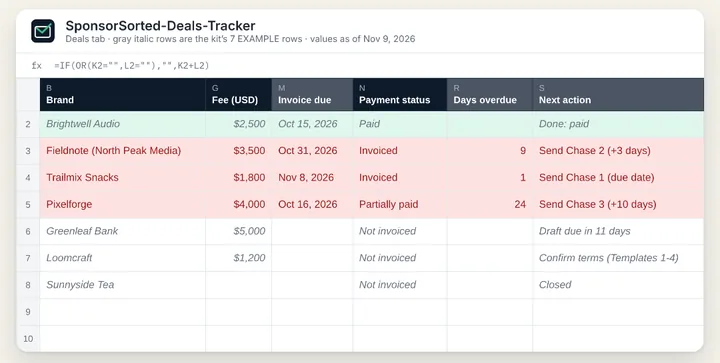
From first email to paid: one label, one row, one next action. Labels 4 to 6 are ones you apply by hand; the filters apply 1-Review, 2-Scam-Risk, 3-Low-Value, Check-Sender and Newsletter.
Quick Start guide
The 5 setup steps with times, plus the weekly check.
Format: a .zip with the Gmail filter file (.xml), the tracker (.xlsx you open in Google Sheets) and the guides and templates as text files you can read on any device. Setup needs a computer; daily use works on your phone.
Two add-ons, 15% off when you add them with the kit
After you click “Add to cart” on the kit, Payhip offers these in your cart. Each is also sold on its own at the full price. Both are optional and covered by the same 14-day refund.

Rate Card + Media Kit Template
$20 $17.00 with the kit
Price your next deal from your own numbers. A calculator turns your median views and past deals into a quote, with add-ons for usage, exclusivity and rush, and you copy the prices into a one-page rate card and a media kit. The starting CPM and percentages are placeholders you replace, not industry statistics.

Contract Clause Pack
$22 $18.70 with the kit
16 brand-deal contract clauses in plain English, each with a fill-in version, a filled example and a “push back if” line. Plus a red-flag phrase table to search any contract for, and an email that asks for changes politely.
Not legal advice. This pack helps you spot and discuss common contract terms. It does not replace a lawyer, and rules differ by state. For large deals, have a lawyer licensed in your state review the contract.
“I can do this with folders and stars.”
You can. If folders, stars and calendar reminders already keep every deal on track, keep that system. The kit is for when deals start to repeat and things slip between threads.
“Why pay for templates?”
You pay $29 to skip writing 8 filters, 5 replies, 3 payment reminders and a tracker with the formulas already built.
“Will the filters catch every scam?”
No filter can. Gmail filters match words, senders and attachment types, so a lookalike domain with no other warning sign can get through. That's what the checklist is for. The decision stays with you.
“Do you get access to my inbox?”
No. You import everything yourself, inside your own Gmail account.
For
- YouTubers with roughly 10k to 500k subscribers who get several sponsor emails a month and handle them without a manager.
- Creators tracking deals in a sheet, a notes app or their memory.
Not for
Creators with a manager or agency handling deals, creators who get one or two sponsors a year, and anyone looking for an app. This kit is files you import into Gmail and Google Sheets.
One kit, one payment.
- Free updates to this kit for 12 months.
- 14-day refund, no questions asked: just reply to your receipt email. The same covers either add-on you pick at checkout.
- Checkout runs on Payhip. Pay by card or PayPal.
SponsorSorted Inbox Kit
$29
One-time. 8 Gmail filters, scam checklist, 5 reply templates, 3 payment-chase emails, deals tracker, Quick Start guide.
Get the Inbox Kit for $29You'll go to the kit's page on Payhip. Add it to your cart to see the two optional add-ons.
Want us to build it for you?
We can configure a draft-reply helper for your channel, inside your own Google account: $297, prepared within 72 hours after your complete intake form, or we refund the $297. It never sends email and never needs your password. Setup spots open soon. Join the waitlist and we'll email you when one opens. Kit owners get first dibs on new spots.
See the setup detailsWhat format is it?
A .zip with the Gmail filter file (.xml), the deals tracker (.xlsx, opens in Google Sheets) and the guides and templates as text files.
Do I need Gmail?
Yes. It works with personal Gmail or Google Workspace, in a desktop browser for setup.
How long does setup take?
About 15 to 20 minutes, in 5 steps.
How do I pay?
By card or PayPal, at checkout on Payhip.
How do I get it?
Payhip gives you the download link after checkout and emails you a receipt with the link.
Do I get updates?
Yes. Free updates to this kit for 12 months.
Can I get a refund?
Yes. 14-day refund, no questions asked: just reply to your receipt email. It covers the kit and any add-on you bought with it. Refund Policy
Does the tracker update itself?
You enter deals by hand. The sheet then calculates due dates, balances, days overdue and the next action.
Does it work for emails in other languages?
The filters and templates are written in English.
Is this legal or financial advice?
No. The templates are starting points you edit for each deal.
Questions?
Reply to your receipt email, or write to neuraproducts@gmail.com.
Your next brand email deserves its own label, a check against the scam checklist, and a row in a sheet that tells you when to follow up.
Get the Inbox Kit for $2914-day refund, no questions asked · Free updates for 12 months